Unit 1
What Is an Operating
System?
An operating system is a program that acts as an
intermediary between a user of a computer and the computer hardware.
•
An interface between
the hardware and the user.
•
Provides an easy and
efficient use of the system resources
The purpose of an operating is to provide an environment in which a user can execute programs. An operating system is similar to a government .Like a government ,it performs no useful function itself .It simply provides an environment which other program can do useful work.

Logical architecture of computer system
The two primary objectives of an operating system are:-
· Making computer system easy to use.
· Managing the resources of a computer system.
Functions of
Operating systems
Process Management :-A process is a program in execution. It needs certain resources to run - CPU time, memory, IO, files, etc. A process is not a program though - program is a passive entity, while a process is an active entity - a process is the thing that executes.
An operating system is usually responsible for:
Creating and deleting both user and
system processes.
Suspending and resuming processes.
Providing mechanisms for process synchronization.
Providing mechanisms for process communication.
Providing mechanisms for deadlock handling.
Memory Management:-Allocating memory to the running programs and deal memory location when they are terminated .
An operating system is usually responsible for:
Keeping track of which parts of
memory are currently being used and by whom.
Deciding which processes are to be loaded into memory when memory space becomes
available.
Allocating and deallocating memory space as needed.
I/O-System Management :-Computers have many input and output devices, and controlling them is the job of the operating system. In many cases, devices have their own drivers, but then the operating system must control those device drivers. In general, a user program should not be able to do IO without the assistance of the operating system, since that would represent the shift of burden of managing the IO to user code, instead of the OS or drivers where it belongs.
File Management :-Managing the file system in terms of where the files are stored ,their status and memory locations.
An operating system is usually responsible for:
Creating and deleting files.
Creating and deleting directories.
Supporting primitives for manipulating files and directories.
Security :-Operating systems provide password protection to keep unauthorized users out of the system. Some operating systems also maintain activity logs and accounting of the user's time for billing purposes. They also provide backup and recovery routines for starting over in the event of a system failure.
Networking :-An operating system is also responsible for managing the network connections on the computer where it is running.
Types of
Operating systems
Real-time operating systems: A Real- time OS is the one which
services on-line external processes having strict timing constraints on
response . A very important part of an RTOS is managing the resources of
the computer so that a particular operation executes in precisely the same
amount of time every time it occurs. They are used to control machinery, scientific
instruments and industrial systems.
Batch operating system:-This is the earliest OS ,where only one program is allowed to run at one
time. A popular batch OS is MS DOS.
Multi-user operating systems:-A multi-user operating system allows many different users to take advantage of the computer's resources simultaneously. The operating system must make sure that the requirements of the various users are balanced, and that each of the programs they are using has sufficient and separate resources so that a problem with one user doesn't affect the entire community of users. ex-Linux and Windows 2000.
Multi-tasking operating systems:-A multitasking OS allows more than one program to run at the same time .ex- Linux and Windows 2000.
GUI based operating systems: - Short for Graphical
User Interface, a GUI Operating System contains graphics and icons and is
commonly navigated by using a computer mouse. ex –windows.
Multiprocessing operating
systems - An operating system capable of supporting and utilizing more than
one computer processor. Ex- Linux, Windows 2000.
MS Windows OS
Windows OS was introduced by Microsoft corp. in the year 1985.some of popular versions of operating systems are:-
Windows
· A completely new GUI and visual style know as windows Aero
· Improved searching feature that provide instant search available through all Explorer windows
· New multimedia creation tools ,such as windows DVD maker
· Newly redesigned networking systems , audio ,and display sub-system
· 3.0 version of the framework for developers
· Direct X 10 support
Windows XP : Windows XP was released in October 2001 , keeping it in line of operating systems that are developed by Microsoft corporation for using on general-purpose computer systems . these computers includes home and business desktops , notebook computers, and media centers. Windows XP was developed as the successor of both windows 2000 and windows Me . the letters “XP” in windows XP stands for experience . windows XP is the first consumer-oriented operating systems that is built on the windows NT kernel and architecture by Microsoft . there are several editions of windows . the most common editions of windows XP are the windows XP Home Edition and windows XP professional . the Home Edition is targeted for the home users , while the professional Edition is targeted for the power users as well as business clients.
Windows 2000 : Microsoft released windows 2000 in February 2000 as a part of its professional line. Windows 2000 is based on windows NT kernel. Some of the significant features of Windows 2000 include:
· Supports NTFS along with the support for both FAT16 and FAT32
· Protects memory of individual application and processes so that failure of a single application cannot bring the system down
· Feature encrypted files systems that help in protect sensitive data
· Allows personalization of the menus that help in adapting the menus the way a user works
· Includes greater support for high-speed networking devices , such as cable modems and native ATM
· Includes high-level interfaces for database access and Active Directory services
Windows 98 : It is the upgraded of Microsoft Windows 95 released in June 1998. Some of the newly introduced features in Windows 98 include.
·
Protection ; Provides additional protection for important
files in the computer , for example allowing automatic registry backup.
·
Improved device support : Provides improved support for various new devices,
such as Direct X, DVD, and USB.
·
FAT32 :
Provides the capability to convert a driver to FAT32 without having the
risk of losing any information.
· Internet Explorer : Includes internet explorer 4.0.
UNIX
Unix is popular operating system, developed by AT&T in 1969 and it has been very important to the development of the Internet. It is a multi-processing, multi-user, family of operating systems that run on a variety of architectures. UNIX allows more than one user to access a computer system at the same time. The significant properties of UNIX include:-
Multi-user capability, Multitasking capability ,Portability and security
Architecture of Unix
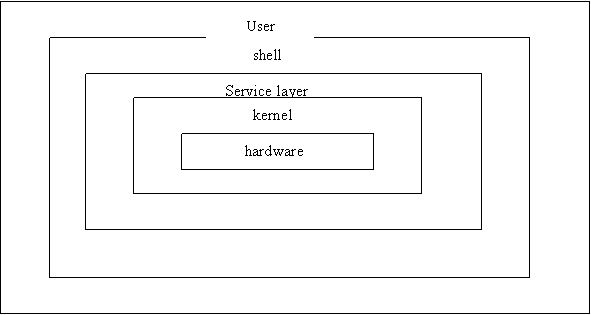
Kernel : kernel
is the core of the UNIX operating system and it gets loaded into memory whenever we switch on the
computer . the kernel contains three components, which are:
· Scheduled : It allows scheduled the processing
of various jobs.
· Device driver : It help in controlling
the input/output devices attached to the computer
· I/O buffer : It controls the I/O
operating in the computer.
The kernel enables a user to access the hardware with the help of system calls, where a system call is a service request that is passed to the kernel for executing a user program .
Various
functions performed by the kernel are:
Initiating and executing
different programs at the same time
Allocating memory to various
user and system processes
Monitoring the files that reside
on the disk
Sending and receiving
information to and from the network
Service layer: In the service layer, requests are received from the shell and they are then
transformed into commands to the kernel.
·
Providing access to various I/O devices, such as
keyboard and monitor
·
Providing access to storage to devices , such as
disk drivers
·
Controlling different files manipulation activities, such as reading from a files and
writing to a files
Shell : the third layer in the UINX architecture is the shell, which acts as an interface between a user and interpreter the request and executing programs. the primary function of the shell is to read the data and instructions from the terminal, and then execute commands and finally display the output on the monitor.
Linux
Linux is an operating system that was initially created as a
hobby by a young student, Linus Torvalds, at the
Unix Command Summary
- cat --- for creating and displaying short files
- chmod --- change permissions
- cd --- change directory
- cp --- for copying files
- date --- display date
- echo --- echo argument
- ftp --- connect to a remote machine to download or upload files
- grep --- search file
- head --- display first part of file
- ls --- see what files you have
- lpr --- standard print command (see also print )
- more --- use to read files
- mkdir --- create directory
- mv --- for moving and renaming files
- ncftp --- especially good for downloading files via anonymous ftp.
- print --- custom print command (see also lpr )
- pwd --- find out what directory you are in
- rm --- remove a file
- rmdir --- remove directory
- rsh --- remote shell
- setenv --- set an environment variable
- sort --- sort file
- tail --- display last part of file
- tar --- create an archive, add or extract files
- telnet --- log in to another machine
- wc --- count characters, words, lines
PROGRAMMING ENVIRONMENT
The Programming environment is
the environment used for creating, compiling, linking and executing or running
of programs. For example, Unix, Linux and Windows environment. Turbo C and
Borland C provide an IDE (Integrated
Development Environment) for developing and editing a program. A
programming environment comprises all those components that facilitate the
development of a program. These components are largely divided under two
categories- programming tools and Application Programming Interfaces (API) . They
are regarded as the building blocks of any programming environment.
An API can be defined as a
collection of data structures, classes, protocols, and pre-defined functions
stored in the form of libraries. These libraries are included in the software packages
of the programming languages like C, C++, etc. An API makes the development
task easier for the programmers, as in-built API components are used again and
again, ensuring reusability.
The software application which is
used for the development, maintenance and debugging of a software program is
known as programming tool. A good programming tool ensures that the programming
activities are performed in an efficient manner. The following are some of the
main categories of programming tools:
- Integrated
Development Environment (IDE): It is the most commonly used tool that
offers an integrated environment to the programmers for software
development. It contains almost all the components for software
development such as compiler, editor, debugger, etc.
- Debugging
tool: It is a specialized tool that helps the programmer to detect and
remove bugs or errors from a program.
.
INTRODUCTION TO THE DESIGN AND IMPLEMENTATION OF CORRECT, EFFICIENT AND
MAINTAINABLE PROGRAMS
The design and development of a
correct, efficient, and maintainable program depends on the approach followed
by the programmer. A programmer should follow standard methodologies throughout
the life cycle of program development. The entire program development process
is divided into a number of phases, with each phase serving a definite purpose.
Also, the output of one phase acts as an input for the next phase. Let us now
understand these standard set of phases in the program development process:
Analysis phase:
As the name suggests, the first phase of
program development involves analyzing the problem in order to ascertain the
objectives that the program is supposed to meet. All the identified
requirements are documented so as to avoid any doubts or uncertainties
pertaining to the functionality of the program.
Designing phase:
This phase involves making the
plan of action before actually starting the development work. The plan is made
on the basis of the program specifications identified in the previous phase.
Different programs require different designing patterns depending on the
program specifications.
Development phase:
This phase involves writing the
instructions or code for the program on the basis of the design document
created in the previous phase. The choice of the programming language in which
the program will be developed is made on the basis of the type of program.
Implementation and Testing:
In this stage, the developed program is
implemented in its target environment and its key parameters are closely
observed in order to ensure that the program runs correctly. Apart from
ensuring the correct functioning of the program this phase primarily focuses on
identifying the hidden bugs in the program.
Characteristics
of a good program
The different aspects of
evaluating a program are : efficiency, flexibility , reliability, portability
and robustness etc.
These characteristics are given
below :
(i)
Efficiency. It is of three type :
programmer effort, execution time and
memory space utilization. The high level languages are used for programmer
efficiency but, a program written in machine language or assembly language is
quite compact and takes less machine time , and memory space . so depending on
the requirement a compromise between programmer effort and execution time can
be made.
(ii)
Flexibility. A
program that can serve many purposes is called a flexible program. For example
, CAD (computer aided design) software are used for different purposes such as
: Engineering drafting, printed circuit board layout and design architectural
design . CAD can also be used in execution time can be made.
(iii)
Reliability. It
is the ability of a program to work its intended function accurately even if there are temporary or
permanent changes in the computer system. Programs having such ability are
known as reliable.
(iv)
Portability. It
is desirable that a program written on a certain type of computer should run
on different type of computer systems. A
program is called portable if it can
be transferred from one system to anther with ease. This feature helps a lot in
research work for easy movement of programs. High-level language programs are
more portable than the programs in assembly language.
(v)
Robustness. A program is called robust
if in provides meaningful results
for all inputs . if correct data is supplied at run time,
it will provide the correct result. In case the entered data is incorrect, the
robust program given an appropriate message with no run time errors.
(vi)
User friendly. A
program that can be easily understood
even by a novice is called user friendly. This characteristic makes the program
easy to modify if the need arises . Appropriate messages for input data with
the display of result make the program easily understandable.
(vii)
Self documenting code.
The source code which uses suitable names for the for identifiers is called
self-documenting code. A cryptic name
for an identifiers makes the program
complex and difficult to debug later on(even the programmer may forget the purpose of the identifiers).
So, a good program must have
self-documenting code.
Techniques for designing program are:-
·
Top-down Design (Stepwise Refinement)
·
Modular Approach
·
Structured Programming
Top-down Design (Stepwise Refinement)
Program development includes designing, coding, testing and
verification of a program in any computer language. For writing a good program,
the top down design approach can be used. It is also called systematic
programming or hierarchical program design or stepwise refinement. A complex
problem is broken into smaller subproblems, further each subproblem is broken
into a number of smaller subproblems and so on till the subproblems at the
lowest level are easy to solve. Similarly a large program is broken into a
number of subprograms and in turn each subprogram is further decomposed into
subprograms and so on. Suppose we want to solve a problem S, which can be
decomposed into subproblems S1, S2 and S3 and so on. Let the program for S,
S1,S2, S3 be denoted by P, PI, P2, P3 respectively. Further suppose that S2 is
solved by decomposing it into subproblems S21 and S22 and program P21 and P22
are written for these. This operation of coding a subprogram in terms of lower
level subprograms is known as the process of stepwise refinement. Figure shows the hierarchical decomposition of P
into its subprograms and sub-subprograms.

The advantages of the top-down design approach are :
A large problem is divided into a number of smaller problems
using this approach.
So problem solving becomes easy.
The programs become user friendly (that is easy to read and
understand) and easy to maintain and modify.
Different programmers can write the modules for different
levels.
Modular Approach
Breaking down a problem into smaller independent modules
help to focus on a particular module of the problem more easily without
worrying about the entire problem. No processing outside the module should
affect the processing inside the module. It should have only one entry point
and one exit point. We can easily modify a module without affecting the other
modules. Using this approach the writing, debugging and testing of programs
becomes easier than a monolithic program. A modular program is readable
and easily modifiable. Once we have checked that all the modules are working
properly, these are linked together by writing the main module. The main module
activates the various modules in a predetermined order. For example, Figure
illustrates this concept :
Main module

Advantages of Modular Approach
(i) Some
modules can be used in many different problems.
(ii) Modules being small units can be easily tested and
debugged.
(iii) Program maintenance is easy as the malfunctioning
module can be quickly identified and corrected.
(iv) The large project can be easily finished by dividing
the modules to different programmers.
(vi) Each module can
be tested independently.
Structured Programming
Structured programming takes a top-down
approach that breaks programs
into modular forms. The main objectives of
structured programming are
·
Efficiency
·
Readability
·
Clarity of programs
·
Easy modification
·
Reduced testing problems.
The goto statement should be avoided so far as possible.
The three basic building blocks are given below
Sequence Control Structure : It consists of a single
statement or a sequence of statements with a single entry and single exit as
shown in Figure


Binary decision structure:- It consists of a
condition (simple or compound ) and two branches out of which one is to be
followed depending on the condition being true or false as shown below:-

Generations of Programming Languages
A programming language is a set
of rules that tells the computer what operations to do. These languages are
used by the programmers to create other kinds of software.
To see how it works, this is
important to understand that there are five levels, Generations, of programming
languages, ranging from low-level to high-level. The five generation of
programming languages start at the lowest level with (l) machine language. They
then range up through (2) assembly language, (3) high level languages
(procedural and object-oriented languages), and (4) very high level languages
(problem-oriented languages). At the highest level are (5) natural languages.
First Generation: Machine Language
Machine language is the basic
language of the computer, representing data as 1s and Os. Each CPU model has
its own machine language: Machine language programs vary from computer to
computer, i.e., they are machine-dependent. . These binary digits, which
correspond to the on and off electrical states of the computer, are clearly not
convenient for people to read and use.
Advantages:-
Very efficient
Require less storage space
Disadvantages:-
Machine dependent
Programming is difficult
Second Generation: Assembly Language
assembly language is a low-level
programming language that allows a computer user to write a program using
abbreviations or more easily remembered words instead of numbers, A programmer
can write instructions in assembly language more quickly than in machine
language, In these languages, each numeric instruction is assigned a short name
(called a mnemonic) that is easier to remember than a number.
Advantages:-
- It is easier to modify than machine language
- Easier to understand and use
Disadvantages:-
- The coding to assembly language is time consuming
- They are also machine dependent
An assembler, or assembler
program, is a program that translates the assembly-language program into
machine language.
Assembler
An assembler is a computer
program that translates assembly language statements into machine language
codes. The assembler takes each of the assembly language statements from the
source code and generates a corresponding bit stream using O's and 1 's. The
output of the assembler in the form of sequence of O's and l's is called object
code or machine code. This machine code is finally executed to obtain the
results.
Third Generation: High-Level or Procedural Languages
A high level or procedural
language resembles some human language such as English. For example, COBOL,
which is used for business applications. A procedural language allow users to
write in a familiar notation, rather than numbers or abbreviations, Also,
unlike machine and assembly languages, most of procedural languages are not
machinedependent-i.e., they can be used on more than one kind of computer. Few
examples, are FORTRAN, COBOL, BASIC and Pascal.
For a procedural language we need
language translator to translate it into machine language. Depending on the
procedural language we may use either of the following types of translators: -
a compiler or an interpreter.
Compiler
The compiler is a computer
program that translates the source code written in a high-level language into
the corresponding object code of the low-level language. This translation
process is called compilation. The entire high-level program is converted into
the executable machine code file. Compiled languages include COBOL, FORTRAN,
C,C++, etc.
Interpreter
The interpreter is a translation
program that converts each high-level program statement into the corresponding
machine code. This translation process is carried out just before the program
statement is executed. Instead of the entire program, one statement at a time
is translated and executed immediately. The commonly used interpreted language
is BASIC and PERL.
Compiler
(a) Scans the entire program
first and translates it into machine code.
(b) Converts the entire program
to machine code
(c) Slow for debugging (removal
of mistakes from a program).
(d) Execution time is less.
Interpreter
(a) Translates the program line
by line.
(b) Each time the program is
executed, every line is checked for syntax error and then converted to
equivalent machine code.
(c) Good for fast debugging.
Advantages:-
·
These are easy to learn.
·
Easier to maintain.
·
They are not machine dependent.
·
Programs are portable.
Fourth Generation: Problem Oriented Languages
Third-generation languages
tell the computer how to do something. Fourth generation languages, in
contrast, tell the computer what to do. Very
high-level or problem-oriented languages, also called fourth-generation
languages (4 GLs), are much
more user-oriented and allow users to develop programs with fewer commands
compared with procedural languages, although they require more computing
power. These languages are known as problem-oriented
because they are designed to solve specific problems, whereas procedural
languages are more general-purpose languages.
Three types of
problem-oriented languages are report generators, query languages, and
application generators.
Report generators
A report generator, also known as a report writer, is a
program for end-users that produces a report. The report may be a printout or a
screen display.
Query languages
A query language is an easy-to-use language for retrieving
data from a database management system.
Application generators
An application generator is a
programmer's tool consisting of modules that have been preprogrammed to
accomplish various tasks
Fifth Generation: Natural
Languages
Natural languages are of two types. The first are ordinary human
languages: English, Spanish etc. The second are programming languages that use
human language to provide people a more natural connection with computers.
Natural languages are part of the
field of study known as artificial intelligence. Artificial intelligence
(AI) is a group of related technologies that attempt to develop machines
capable of emulating human-like qualities, such as learning, reasoning,
communicating, seeing and hearing.
Use of High Level
Programming Languages for the Systematic Development of Programs
Let us now consider some of the
third-generation, or high-level languages in use today.
BASIC (Beginner's All-purpose Symbolic Instruction Code) used to be
the most popular microcomputer language and is considered the easiest
programming language to learn. Although it is available in compiler form, the
interpreter form is more popular with first-time and casual users. This is
because it is interactive, meaning that user and computer can communicate with
each other during the writing and executing (running) of the program. Today
there is no one version of BASIC.
Advantage: The primary advantage
of BASIC is its ease of use.
Disadvantages: Its processing speed is slow.
COBOL:
COBOL is the language of business
and it was formally adopted in 1960, COBOL
(for Common Business-Oriented Language)
is the most frequently used business programming language for large
computers. Its most significant attribute is that it is extremely readable. For
example, a COBOL statement might be :
MULTIPLY HOURLY-RATE BY
HOURS-WORKED GIVING TOTAL-PAY
COBOL, too, has both advantages
and disadvantages.
Advantages:
(1) It is machine independent.
(2) Its English-like statements
are easy to understand, even for a nonprogrammer.
(3) It can handle many files,
records, and fields.
(4) It easily handles
input/output operations.
Disadvantages:
(1) Because it is so readable, it
is wordy. Thus, even simple programs are lengthy, and programmer productivity
is slowed.
(2) It cannot handle mathematical
processing as well as FORTRAN
FORTRAN:
FORTRAN is the language of
mathematics and the first high-level language. It was developed in 1954 by IBM;
FORTRAN (for FORmula TRANslator) was the first high-level
language. Originally designed to express mathematical formulas, it is still the
most widely used language for mathematical, scientific, and engineering
problems. It is also useful for complex business applications, such as
forecasting and modeling.
FORTRAN has both advantages and
disadvantages:
Advantages:
(1) FORTRAN can handle complex
mathematical and logical expressions
(2) Its statements are relatively
short and simple.
(3) FORTRAN programs developed on
one type of computer can often be easily modified to work on other types.
Disadvantages:
(1) FORTRAN does not handle input
and output operations to storage devices as efficiently as some other
higher-level languages.
(2) It has only a limited ability
to express and process non-numeric data.
(3) It is not as easy to read and
understand as some other high-level languages.
Pascal:-
Pascal is the simple language.
Named after the 17th-century French mathematician Blaise Pascal, Pascal is
an alternative to BASIC as a language for teaching purposes and is relatively
easy to learn. A difference form BASIC is that Pascal uses structured
programming.
A compiled language, Pascal
offers these advantages and disadvantages:
Advantages:
(1) Pascal is easy to learn.
(2) It has extensive capabilities
for graphics programming. (3) It is excellent for scientific use.
Disadvantage: Pascal has limited
input/output programming capabilities, which limits its business applications.
C++ is an Object Oriented Programming (OOP) language. In C++-the
plus signs stand for "more than C"-which combines the traditional C
programming language with object-oriented capability. C++ was created by Bjame
Stroustrup. Three important concepts of OOP are:
Encapsulation, Inheritance,
Polymorphism
Advantages
(1) It is portable.
(2) Once the programmer has
written a block of program code, it can be reused in number of program.
GUI based Languages
The Graphical User Interface (GUI as the name suggests, uses illustrations
for text, which help users to interact with an application. This feature makes
it easier to understand things in a quicker and easier way.
Visual Basic: Visual Basic is an example of visual programming.
Visual BASIC is a Windows-based, object-oriented programming language from
Microsoft that lets users develop Windows and office applications.
Visual C++ : This language is a GUI extension of conventional
C++ language. It is a part of Microsoft Visual Studio software package. It is
an Object Oriented Programming language that has been designed for producing
high level object oriented applications, that can work with hardware devices,
for example-Windows applications and device drivers.
Need of
data Structures and Algorithms
Data
structure: In computer science, a data structure is
a way of storing data
in a computer so that it can be used efficiently.
Often a carefully chosen data structure
will allow the most efficient algorithm to be used. The choice of the data
structure often begins from the choice of an abstract data type. a
well-designed data structure allows a
variety of critical operations to be performed, using as few resources, both
execution time and memory space, as possible . Data structure is implemented by
a programming language as data types and the reference and operations they provide.
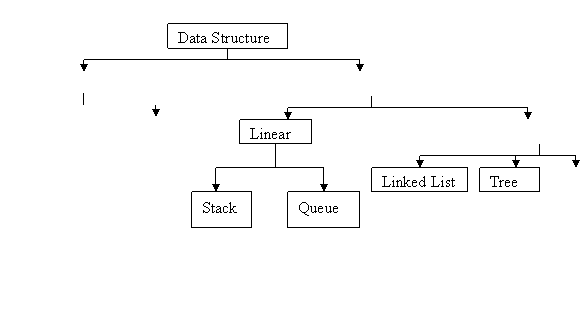
The data structure can be classified into following two types:
1. Simple data
structures
these data
structure are generally built from fundamental data types i.e. int. etc.
following data structure can be termed as simple data structure.
(i) Array (ii) Structure.
2. Compound
data Structure.
These data structure are formed by using
simple data structure and are more complex. Its two types are.
(i) Linear data structure (ii) non -Linear data structure
(i) Linear data structure. These are single level data structure,
having their elements in sequence. Examples of linear data structure are.
(a) Stack (b) Queue (c) Linked list.
(ii) Non-linear data structure. These
are multilevel data structure. Examples of non-linear data structure are.
(a) Tree (b) Graph.
Figure shows different type of data structure:
Graph Non Linear Array Structure Compound Data structure Simple Data Structure


Array It is a collection
of Homogenous (Similar Type) data elements. An array is also called a linear
data structure. It is elements are stored in computer memory in a linear
fashion.
Structure: It is a
collection of logical related field in which the fields of may be same or
different types. The fields that construct the structure are called member of
the structure. For example a student record or structures may contain the
following fields
Roll no, student name, class ,
address, marks.
Stack: It is defined as a list ( a Linear data structure ) in which all the insertion and
deletion performed at one end called TOP of the Stack. The insertion operation
is known as PUSH and the deletion operation is known as POP. The information is
processed in LIFO (Last In First Out). Example pile of books
QUEUE: it is defined as list as a liner data structure in
which the deletion and addition (insertion) operations are performed at FRONT
and REAR respectively. The information is processed in FIFO (First In First
Out) or FCFS (First Come and First Served) way.
Example person entering airways reservations counter.
Linked List: It is
defined as linear collection of data elements called nodes where each node
consists of two parts i.e. information and pointer to next node. The last node
contains NULL pointer. A list pointer variable FIRST or START contains the
addresses of the first node in the list. A linked list having no node is called
NULL list or empty list.
Tree :
A tree is a
collection of nodes, which is dynamic in nature. One of its important types is
a binary tree.
Errors and Debugging
Errors may be made during
program creation even by experienced programmers. Such types of errors are
detected by the compiler. Debugging means removing the errors. The errors are
categorized in following types:
·
Syntax error
·
Logical error
·
Linking error
Syntax Errors:- These are detected by the compiler. If any grammatical error is
made in the program, then during compilation step the compiler will display an
error message.
Linking Errors. These may occur during the
linking process. For example, if we call a function in main () which is not
defined then a linking error will be displayed. Correct it and then go ahead.
Logical Errors:- These may occur due to
error made by the programmer in the logic of the program. The results are wrong
if such errors are present in the program..
Problem Solving Methodology
Program Code
General Concepts: A
program is a sequence of instructions written in a programming language.

 Prwerewrwre

 Input Output


For better designing of a program a systematic planning must be done. Planning makes a program more efficient and more effective.
Problem Solving is one of the most significant advantages of a computer.
Before writing a program, it is a good practice to understand the complete problem analyzes the various solutions and arrive at the best solution.

There are various planning tools for the program logic, such as algorithm, pseudocode and flowcharts.
1. Algorithm
An Algorithm is a finite set of instructions which is followed accomplish a particular task. In addition every algorithm must satisfy the following criteria:
1. Input :> There are zero or more quantities which are externally supplied.
2. Output :> At least one quantity is produced.
3. Definiteness :> Each instruction must be clear and unambiguous.
4. Finiteness :> If we trace out the instructions of an algorithm, then for all cases the algorithm will terminate after a finite number of steps.
5. Effectiveness: Every instruction must be sufficiently basic that it can in principle be carried out by a person using only pencil and paper.
Types of an algorithm
- Dynamic Programming Algorithms: This class
remembers older results and attempts to use this to speed the process of
finding new results.
- Greedy Algorithms: Greedy algorithms attempt not only to find a solution,
but to find the ideal solution to any given problem.
- Randomized Algorithms: This class
includes any algorithm that uses a random number at any point during its
process.
- Simple Recursive Algorithms: This type of
algorithm goes for a direct solution immediately, then backtracks to find
a simpler solution.
- Backtracking Algorithms: Backtracking algorithms test for a solution, if one is found
the algorithm has solved, if not it recurs once and tests again,
continuing until a solution is found.
- Divide
and Conquer Algorithms:
A divide and conquer algorithm is similar to a branch and bound algorithm,
except it uses the backtracking method of recurring in tandem with
dividing a problem into sub problems
Example:
1. Write an algorithm to convert the temperature in centigrade to the temperature in Fahrenheit.
Solution:
1. Read the numeric value of C.
2. Calculate F using Formula F= (9/5)*c+32.
3. Write numeric value of F.
4. Stop
2. Write an algorithm to checking whether a number is even or odd.
Solution:
1. Read the given number, say x.
2. Devide x by 2.
3. If the remainder is 1, then print x is odd
4. Otherwise print x is even.
5. Stop.
3. Write an algorithm to find the area of circle.
Solution:
1. Read the value of radius.
2. Calculate area using formula area=3.14*radius*radius.
3. Write the value of radius.
4. Stop.
Efficiency of algorithm
Efficiency of algorithm means how fast it can produce the correct result for the given problem. The efficiency of an algorithm depends upon its time complexity and space complexity.
1. Space complexity of an algorithm refers to the amount of memory required by the algorithm for the execution and generation of final result.
2. Time complexity of an algorithm refers to the amount of computer time required by an algorithm for its execution.
Algorithm Termination
A termination is a type of mathematical proof that plays a critical role in formal verification because total correctness of an algorithm depends on termination.
A Simple general method for constructing termination proof involves associating a measure with each step of an algorithm. The measure with each step of an algorithm. The measure is taken from the domain of a well founded relation, such as from the ordinal numbers. If the measure “decreases” according to the relation along every possible step of the algorithm, it must terminate, because there are no infinite descending chain.
Example
I=0
Loop until i=size_of_data
Process data (data[i])
I=I+1
If the value of size_of_data is non negative, fixed and finite, the loop will eventually terminate, assuming process-data terminate too.
I=1
Loop until i=0
I=I+1
Never terminate
Correctness of Algorithm:
In theoretical computer science, correctness of an algorithm is asserted when it is said that the algorithm is correct with respect to a specification. Functional correctness refers to the input – output behaviors of the algorithm.
A distinction is made between total correctness, which additionally required that the algorithm terminates, and the partial correctness, which simply required that if an answer is returned it will be correct. Since there is no general solution to the halting problems a total correctness assertion may lie much deeper.
2. Pseudocode
The pseudocode is one of another program logic planner tool, which means false code.
The pseudocode is just the algorithm written by using programming language syntaxes.
Example:
- Write the pseudocode for calculating the area of circle.
Solution:
1. Scan radius.
2. Area=3.14*radius*radius.
3. Print radius;
4. Stop.
- Write the pseudo code for print the maximum number between two numbers
.
Solution:
1. Input a and b.
2. If a>b then
3. Print a
4. Else
5. Print b.
6. End
3. FLOWCHARTING
INTRODUCTION
The flowchart is a means of visually presenting the flow of data through an information processing systems, the operations performed within the system and the sequence in which they are performed. In this lesson, we shall concern ourselves with the program flowchart, which describes what operations (and in what sequence) are required to solve a given problem. The program flowchart can be likened to the blueprint of a building. As we know a designer draws a blueprint before starting construction on a building. Similarly, a programmer prefers to draw a flowchart prior to writing a computer program. As in the case of the drawing of a blueprint, the flowchart is drawn according to defined rules and using standard flowchart symbols prescribed by the American National Standard Institute, Inc.
OBJECTIVES
At the end of this lesson, you will be able to understand:
- the meaning of flowchart
- the basic parts of the flowchart such as flowchart symbols and the flow lines connecting these symbols.
- the advantages and limitations of flowchart
MEANING OF A FLOWCHART
A flowchart is a diagrammatic representation that illustrates the sequence of operations to be performed to get the solution of a problem. Flowcharts are generally drawn in the early stages of formulating computer solutions. Flowcharts facilitate communication between programmers and business people. These flowcharts play a vital role in the programming of a problem and are quite helpful in understanding the logic of complicated and lengthy problems. Once the flowchart is drawn, it becomes easy to write the program in any high level language. Often we see how flowcharts are helpful in explaining the program to others. Hence, it is correct to say that a flowchart is a must for the better documentation of a complex program.
GUIDELINES FOR DRAWING A FLOWCHART
Flowcharts are usually drawn using some standard symbols; however, some special symbols can also be developed when required. Some standard symbols, which are frequently required for flowcharting many computer programs are shown in Fig. 25.1
|
|
Start or end of the program |
|
Computational steps or processing function of a program |
|
|
Input or output operation |
|
|
Decision making and branching |
|
|
Connector or joining of two parts of program |
|
|
Magnetic Tape |
|
|
Magnetic Disk |
|
|
Off-page connector |
|
|
Flow line |
|
|
Annotation |
|
|
Display |

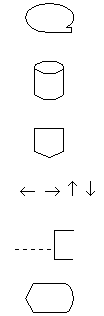
Fig. 25.1 Flowchart Symbols
The following are some guidelines in flowcharting:
- In drawing a proper flowchart, all necessary requirements should be listed out in logical order.
- The flowchart should be clear, neat and easy to follow. There should not be any room for ambiguity in understanding the flowchart.
- The usual direction of the flow of a procedure or system is from left to right or top to bottom.
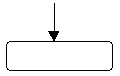
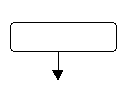
- Only one flow line should come out from a process symbol.
 or
or 
- Only one flow line should enter a decision symbol, but two or three flow lines, one for each possible answer, should leave the decision symbol.
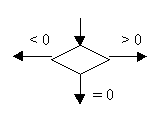
- Only one flow line is used in conjunction with terminal symbol.
- Write within standard symbols briefly. As necessary, you can use the annotation symbol to describe data or computational steps more clearly.

- If the flowchart becomes complex, it is better to use connector symbols to reduce the number of flow lines. Avoid the intersection of flow lines if you want to make it more effective and better way of communication.
- Ensure that the flowchart has a logical start and finish.
- It is useful to test the validity of the flowchart by passing through it with a simple test data.
ADVANTAGES OF USING FLOWCHARTS
The benefits of flowcharts are as follows:
- Communication: Flowcharts are better way of communicating the logic of a system to all concerned.
- Effective analysis: With the help of flowchart, problem can be analysed in more effective way.
- Proper documentation: Program flowcharts serve as a good program documentation, which is needed for various purposes.
- Efficient Coding: The flowcharts act as a guide or blueprint during the systems analysis and program development phase.
- Proper Debugging: The flowchart helps in debugging process.
- Efficient Program Maintenance: The maintenance of operating program becomes easy with the help of flowchart. It helps the programmer to put efforts more efficiently on that part
LIMITATIONS OF USING FLOWCHARTS
- Complex logic: Sometimes, the program logic is quite complicated. In that case, flowchart becomes complex and clumsy.
- Alterations and Modifications: If alterations are required the flowchart may require re-drawing completely.
- Reproduction: As the flowchart symbols cannot be typed, reproduction of flowchart becomes a problem.
- The essentials of what is done can easily be lost in the technical details of how it is done.
Flow Charts
Understanding and Communicating How a Process Works
Related variants: Process Maps and Process
Flow Diagrams
Flow charts are easy-to-understand diagrams showing how steps in a process fit together. This makes them useful tools for communicating how processes work, and for clearly documenting how a particular job is done. Furthermore, the act of mapping a process out in flow chart format helps you clarify your understanding of the process, and helps you think about where the process can be improved.
A flow chart can therefore be used to:
- Define and analyze processes;
- Build a step-by-step picture of the process for analysis, discussion, or communication; and
- Define, standardize or find areas for improvement in a process
Also, by conveying the information or processes in a step-by-step flow, you can then concentrate more intently on each individual step, without feeling overwhelmed by the bigger picture.
How to Use the Tool:
Most flow charts are made up of three main types of symbol:
- Elongated circles, which signify the start or end of a process;

- Rectangles, which show instructions or actions; and

- Diamonds, which show decisions that must be made

Within each symbol, write down what the symbol represents. This could be the start or finish of the process, the action to be taken, To draw the flow chart, brainstorm process tasks, and list them in the order they occur. Ask questions such as "What really happens next in the process?" and "Does a decision need to be made before the next step?" or “What approvals are required before moving on to the next task?"
Start the flow chart by drawing the elongated circle shape, and labeling it "Start".
Then move to the first action or question, and draw a rectangle or diamond appropriately. Write the action or question down, and draw an arrow from the start symbol to this shape.
Work through your whole process, showing actions and decisions appropriately in the order they occur, and linking these together using arrows to show the flow of the process. Where a decision needs to be made, draw arrows leaving the decision diamond for each possible outcome, and label them with the outcome. And remember to show the end of the process using an elongated circle labeled "Finish".
Finally, challenge your flow chart. Work from step to step asking yourself if you have correctly represented the sequence of actions and decisions involved in the process.
And then (if you're looking to improve the process) look at the steps identified and think about whether work is duplicated, whether other steps should be involved, and whether the right people are doing the right jobs.
|
Tip: |
Example:
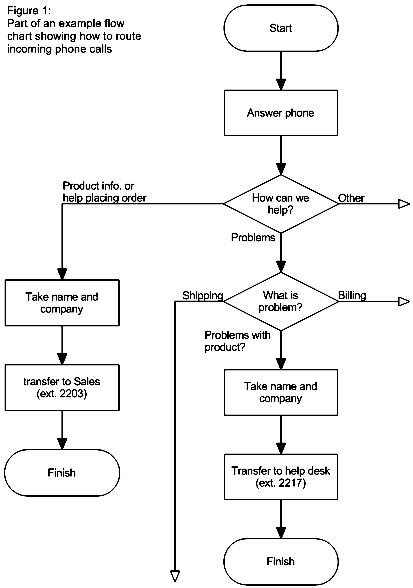
The example below shows part of a simple flow chart which helps receptionists route incoming phone calls to the correct department in a company:
|
|
Drawn using SmartDraw. Click for free download. |
Key Points:
Flow charts are simple diagrams that map out a process so that it can easily be communicated to other people.
To draw a flowchart, brainstorm the tasks and decisions made during a process, and write them down in order.
Then map these out in flow chart format using appropriate symbols for the start and end of a process, for actions to be taken and for decisions to be made.
Finally, challenge your flow chart to make sure that it's an accurate representation of the process, and that that it represents the most efficient way of doing the job.
or the decision to be made.

Sum of first 50 natural numbers
Example 2
Draw a flowchart to find the largest of three numbers A,B, and C.
Answer: The required flowchart is shown in Fig 25.3

Flowchart for finding out the
largest of three numbers
Example 3
Draw a flowchart for computing factorial N (N!)
Where N! = 1 ´ 2 ´ 3 ´ …… N .
The required flowchart has been shown in fig 25.4
Answer:

Flowchart for computing factorial